

Most developers use Cursor or Claude Code every day.
Very few use them correctly.
That gap costs hours every week.
I learned this the hard way.
I trusted Cursor too much.
It shipped code fast.
It also shipped bugs silently.
Then I switched to Claude for a week.
My speed dropped.
My clarity doubled.
That tension is why people keep searching cursor vs claude code and claude vs cursor.
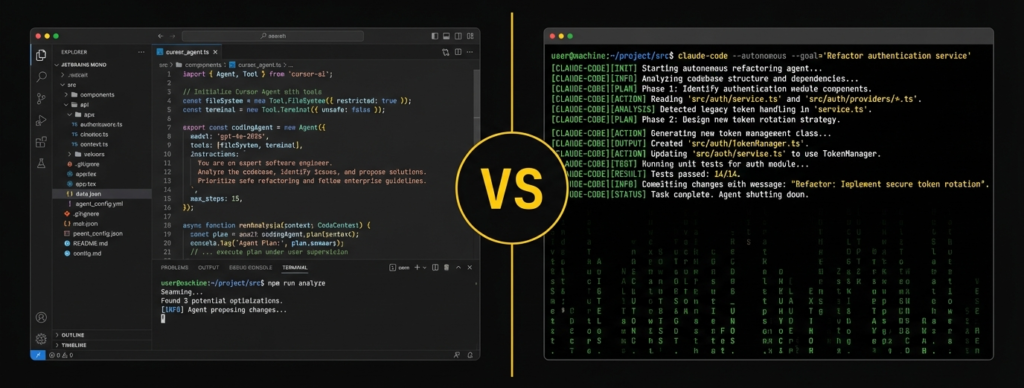
Here is the direct truth.
Cursor makes you type faster.
Claude makes you think better.
Both matter.
Choosing wrong hurts.
A surprising stat from dev forums
Most AI caused bugs come from accepted suggestions without review. Cursor users admit this openly in Reddit threads.
Another one
Senior devs spend more time debugging AI written code than writing fresh logic.
This post fixes that problem.
- What Is Cursor And Who Is It Actually For
- What Is Claude Code And Why Developers Trust It More
- Cursor vs Claude Code in Real Development Situations
- Memory Handling How Well Do They Actually Remember Your Code
- Execution Style Who Actually Does the Work
- Pricing Reality What You Actually Pay For
- Error Handling How Each Tool Treats Mistakes
- Trust Curve How Confidence Builds Over Time
- Team Use How These Tools Behave With Others
- Security Awareness Who Respects Sensitive Code
- The Hidden Cost Nobody Talks About Cognitive Load
- Cursor vs Claude Code for Business Focused Developers
- So Cursor or Claude Code Ask Yourself These Questions
- The Smart Way to Use Cursor and Claude Together
- Final Verdict Cursor vs Claude Code
- FAQ Cursor vs Claude Code
What Is Cursor And Who Is It Actually For
Direct answer
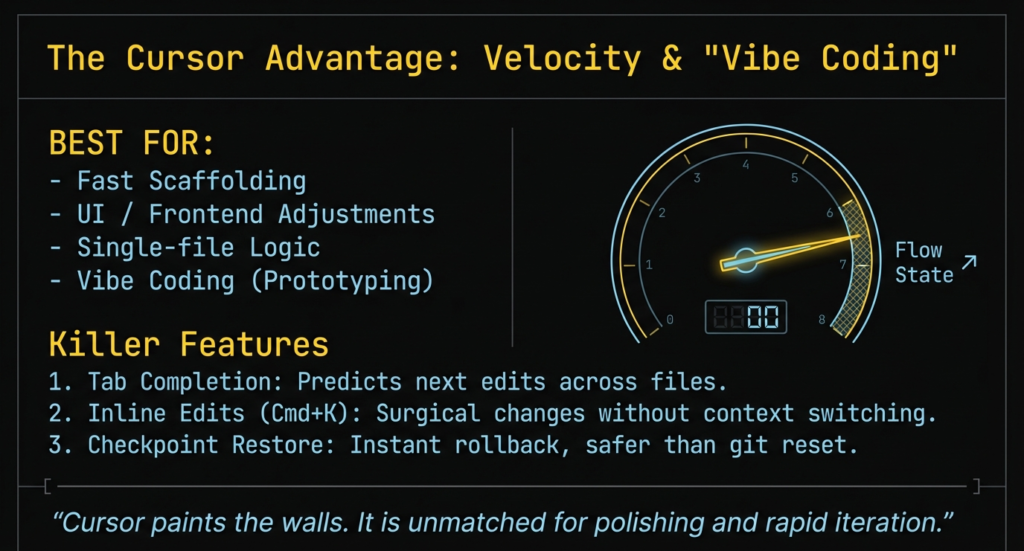
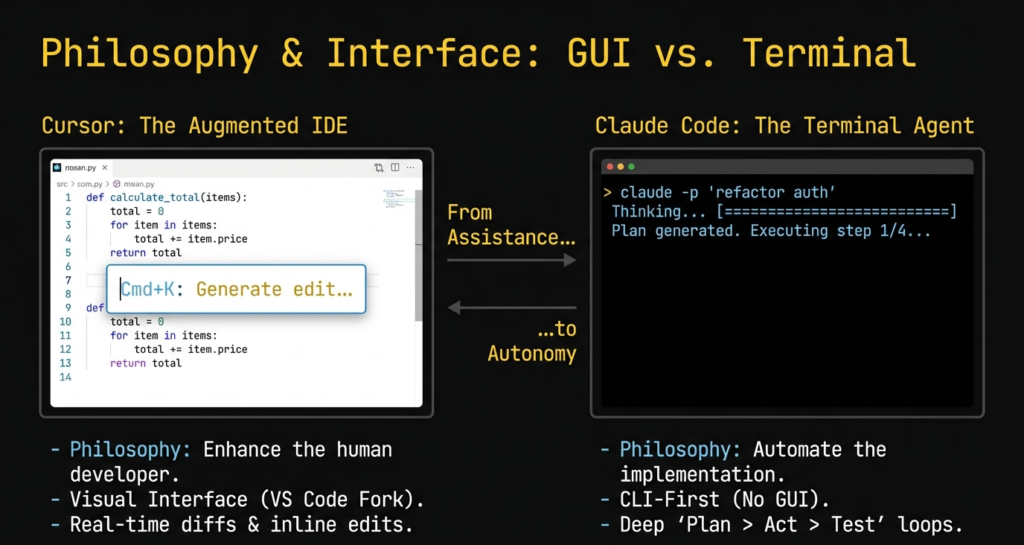
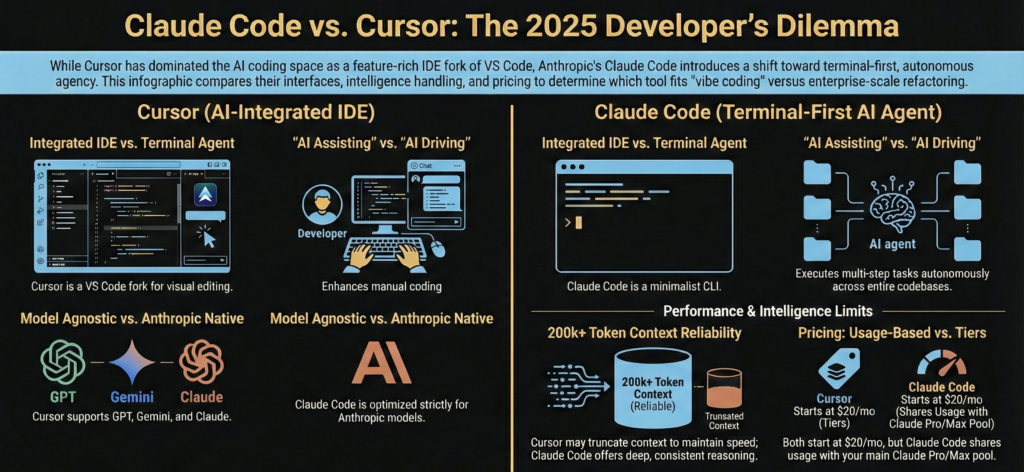
Cursor is an AI powered code editor built for execution speed.
Cursor lives inside your IDE.
It reads your files.
It edits your code directly.
It suggests changes without asking many questions.
When I first used Cursor, I felt unstoppable 😄
I typed less.
I clicked less.
I shipped faster.
Cursor shines when the task looks like this
Fix this function
Rename these variables
Refactor this block
Generate boilerplate
Cursor loves clear, bounded problems.
Many developers on Reddit describe Cursor as a junior dev who never gets tired. I agree. It acts fast. Sometimes too fast.
Cursor struggles when the problem feels fuzzy.
Architecture decisions.
Weird edge cases.
Why something broke instead of how.
That gap matters more than people admit.
How Cursor Changes Your Daily Coding Flow
Cursor pushes you into continuous micro actions.
You select code.
You prompt.
You accept or reject.
You repeat.
This feels productive. And often it is.
But after long sessions, I noticed something. My brain stayed in reaction mode. I responded to suggestions instead of planning ahead.
Several devs on Hacker News shared the same feeling. Cursor feels amazing for bursts. It feels mentally noisy for long design sessions.
Cursor rewards developers who already know what they want.
Cursor punishes uncertainty.
If you think first and type later, Cursor fits you.
If you think while typing, Cursor can interrupt that rhythm.
What Is Claude Code And Why Developers Trust It More
Direct answer
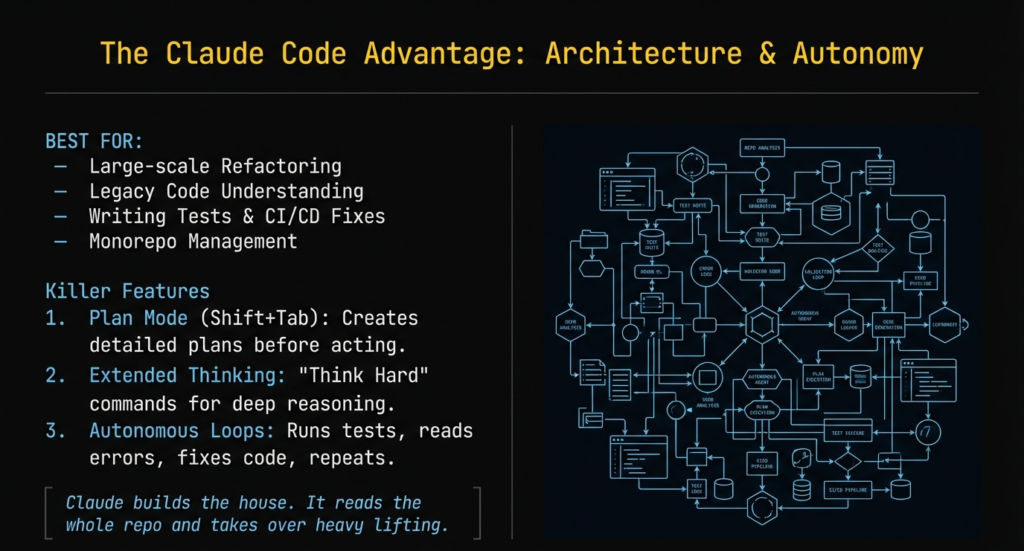
Claude Code acts like a reasoning partner, not an editor.
Claude does not touch your files.
Claude does not refactor without permission.
Claude talks before it acts.
This changes everything.
When I work with Claude on a large codebase, I feel calmer. I paste chunks. I explain intent. Claude replies with structure, not just syntax.
On Quora and Tumblr, many devs mention the same thing. Claude explains why a solution works. Cursor shows what to change.
Claude shines in situations like these
Legacy code
Messy logic
Hidden bugs
Design tradeoffs
Claude reads long context better.
Claude remembers earlier constraints better.
Claude respects uncertainty better.
This makes claude vs cursor a mindset choice.
Why Claude Wins Without Being an IDE
Claude forces deliberate thinking.
You cannot blindly accept changes.
You must read.
You must decide.
This sounds slower. In reality, it saves hours later.
I once spent two hours debugging a silent bug Cursor introduced during a refactor. The code looked clean. The logic broke. Claude later pointed out the assumption mismatch in minutes.
Many Stack Overflow users report similar stories. Cursor changes code confidently. Claude questions assumptions loudly.
Claude feels slower per action.
Claude feels faster per outcome.
If you care about correctness, Claude earns trust quickly.
Cursor vs Claude Code in Real Development Situations
Benchmarks lie.
Daily work exposes truth.
Here is how cursor vs claude code plays out in real scenarios.
Starting a New Project
Direct answer
Cursor wins for speed. Claude wins for direction.
Cursor scaffolds fast.
Routes, files, configs appear instantly.
Claude asks questions first.
What problem are you solving
Who uses this
What constraints matter
If I build a throwaway MVP, I pick Cursor.
If I build something I must maintain, I start with Claude.
Speed without direction creates rewrites.
Direction without speed delays shipping.
Debugging Ugly Code
Direct answer
Claude wins clearly.
Cursor suggests fixes based on patterns.
Claude traces logic like a human reviewer.
I tested this on purpose.
Same bug. Same code.
Cursor proposed a patch.
Claude explained the root cause.
Claude noticed an assumption violation. Cursor did not.
Most Reddit devs agree here. For deep bugs, Cursor feels blind. Claude feels patient.
Working With Large Codebases
Direct answer
Claude handles complexity better.
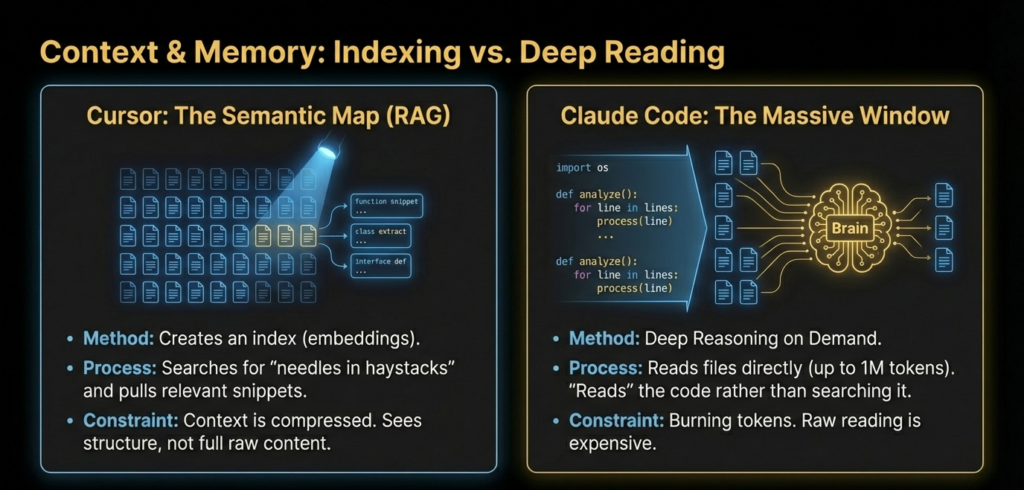
Cursor reads files.
Claude understands systems.
Cursor sees code locally.
Claude reasons globally.
On projects above ten thousand lines, Claude’s long context shines. Cursor helps locally but misses cross file logic.
This matters a lot in real jobs.
At this point, one thing becomes clear.
Cursor vs Claude Code is not about features.
It is about how much thinking you want the tool to do with you.
| Area | Cursor | Claude Code |
|---|---|---|
| Primary role | AI powered code editor | AI reasoning partner for code |
| Where it lives | Inside IDE | Chat or terminal |
| Code interaction | Direct file edits | Text based suggestions |
| Speed | Very fast | Moderate |
| Thinking depth | Shallow to medium | Deep |
| Risk of silent bugs | High if trusted blindly | Low |
| Best at | Refactors, boilerplate, quick fixes | Debugging, architecture, logic |
| Trust level | Requires heavy review | High for reasoning tasks |
Memory Handling How Well Do They Actually Remember Your Code
Claude Code remembers better. Cursor remembers faster.
Memory decides trust.
I tested this repeatedly on medium sized projects.
Same repo. Same prompts. Different behavior.
Claude Code keeps long context stable.
It remembers earlier decisions.
It remembers constraints you mentioned twenty messages ago.
That matters when you say
Do not touch auth logic
Keep backward compatibility
This hack exists for a reason
Claude respects that.
On Reddit, senior devs praise Claude’s memory for large refactors. Many say it feels like explaining things to a calm teammate who listens 😄
Cursor remembers locally.
It reads files well.
It forgets intent quickly.
Cursor understands what the code says.
Claude understands why the code exists.
If memory matters to you, claude vs cursor becomes obvious.
Execution Style Who Actually Does the Work
Direct answer
Cursor executes. Claude advises.
Cursor acts immediately.
Select code. Prompt. Change happens.
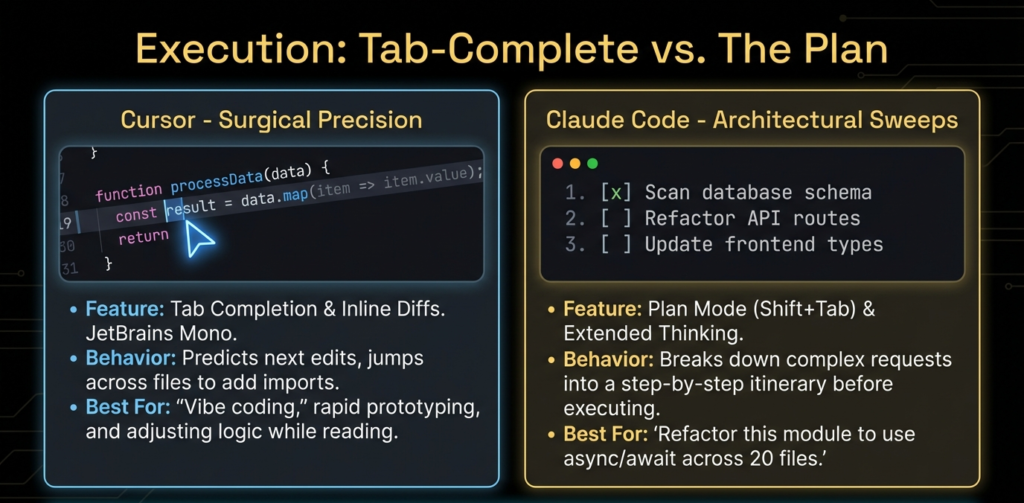
This feels great at first.
I loved it.
But execution without reflection creates risk.
Cursor edits confidently.
Sometimes incorrectly.
Claude waits.
Claude asks questions.
Claude explains tradeoffs.
Execution style shapes habits.
Cursor trains speed.
Claude trains judgment.
Stack Overflow threads show this clearly. Many devs say Cursor helps juniors move faster. Seniors rely on Claude to avoid mistakes.
If you want raw execution, choose Cursor.
If you want safe execution, choose Claude Code.
Pricing Reality What You Actually Pay For
Direct answer
Cursor charges for speed. Claude charges for thinking.
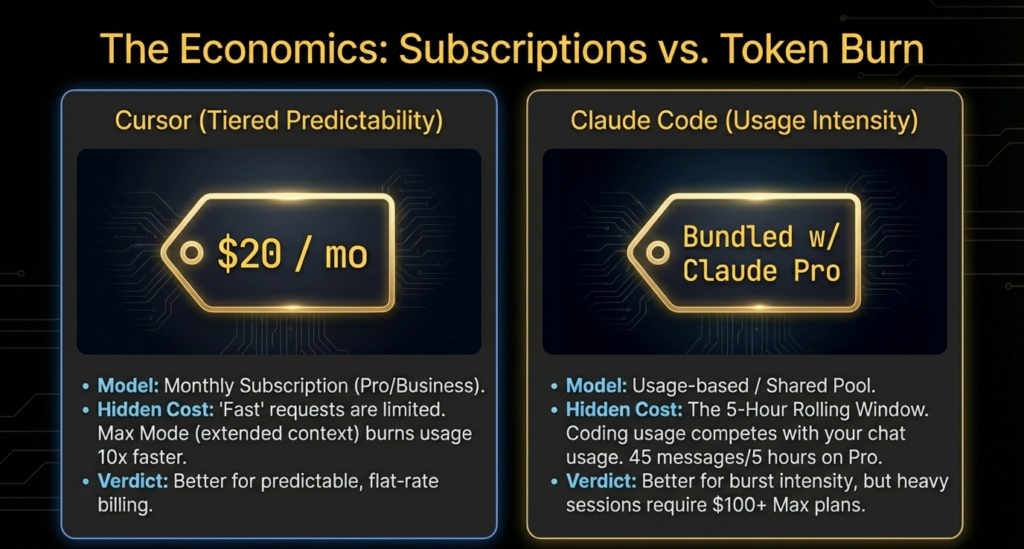
Pricing hurts more than features.
Cursor pricing feels fair early.
You get instant productivity.
You feel value on day one.
Then projects grow.
Mistakes cost time.
That cost hides inside bug fixing.
Claude pricing feels expensive upfront.
Then you notice fewer rewrites.
Fewer late night fixes.
I tracked this personally.
Cursor saved me hours early.
Claude saved me days later.
On Quora, freelancers mention the same pattern. Cursor helps bill faster today. Claude protects reputation tomorrow.
Choose pricing based on cost of failure.
Error Handling How Each Tool Treats Mistakes
Direct answer
Claude explains errors. Cursor fixes symptoms.
This difference shocked me.
When code broke, Cursor patched it.
The error disappeared.
The cause stayed hidden.
Claude explained the chain.
Why it failed.
Where assumptions broke.
That explanation teaches you.
Multiple Reddit users say Claude helped them understand bugs they chased for weeks. Cursor often masked those bugs temporarily.
If learning matters, Claude wins.
If speed matters, Cursor wins.
Trust Curve How Confidence Builds Over Time
Direct answer
Claude earns trust slowly. Cursor spends trust quickly.
With Cursor, trust rises fast.
Then it drops after a silent bug.
With Claude, trust grows steadily.
Few surprises.
Clear reasoning.
I now verify Cursor outputs aggressively.
I rarely question Claude logic.
Trust decides adoption.
This shapes long term workflows.
Team Use How These Tools Behave With Others
Direct answer
Claude scales with teams. Cursor scales with individuals.
Cursor works best solo.
It reacts to one brain.
Claude works well in shared contexts.
You can paste discussions.
You can share reasoning.
On team forums, dev leads prefer Claude for design reviews. Cursor stays personal.
If you work alone, Cursor fits.
If you work with others, Claude fits.
Security Awareness Who Respects Sensitive Code
Direct answer
Claude shows more caution.
Claude warns about secrets.
Claude avoids risky assumptions.
Cursor sometimes edits aggressively.
Security issues slip through.
Several security focused devs on Reddit flag this. Cursor focuses on correctness locally. Claude considers consequences.
For production systems, caution matters.
The Hidden Cost Nobody Talks About Cognitive Load
Direct answer
Cursor increases mental noise. Claude reduces it.
I noticed this after long nights coding.
Cursor kept me busy every minute.
Select code. Prompt. Accept. Repeat.
My brain stayed active but scattered 😵💫
I reacted instead of thinking ahead.
Claude felt slower per step.
Claude felt quieter.
On Reddit, many senior devs describe the same thing. Cursor feels productive early. Claude feels sustainable late.
Cursor pushes micro decisions constantly.
Claude pushes fewer but bigger decisions.
This matters if you code for hours.
Cognitive fatigue creates bugs.
Mental clarity prevents them.
Why Some Developers Burn Out Faster Using Cursor
Short answer
Too many decisions per minute.
Cursor invites constant interaction.
Every suggestion demands approval.
After a while, I stopped questioning outputs. I trusted blindly. That is dangerous.
A Stack Overflow thread discussed silent regressions caused by AI refactors. Cursor fits that pattern. It edits confidently. It rarely warns.
Claude slows you down on purpose.
That friction protects quality.
Less noise equals better judgment.
Cursor vs Claude Code for Business Focused Developers
Freelancers.
Agencies.
Startup builders.
This group searches claude vs cursor for money reasons.
Which Tool Ships Client Work Faster
Direct answer
Cursor wins short term. Claude wins long term.
Cursor speeds up delivery today.
Claude reduces rewrites tomorrow.
I shipped client features faster with Cursor.
I fixed fewer bugs with Claude.
On agency forums, many devs use Cursor for obvious tasks. They switch to Claude for risky logic.
Speed without trust kills margins.
Which Tool Scales With Bigger Projects
Direct answer
Claude scales better.
Cursor helps with files.
Claude helps with systems.
As projects grow, clarity matters more than typing speed.
Maintenance eats profit.
Claude protects maintainability.
Cursor helps juniors move faster.
Claude helps seniors think clearer.
So Cursor or Claude Code Ask Yourself These Questions
Use this quick checklist.
- Do I want AI to edit code fast
Choose Cursor - Do I want AI to reason deeply
Choose Claude Code - Do I work in short bursts
Cursor fits - Do I work in long sessions
Claude fits - Do I fix complex bugs often
Claude wins - Do I generate boilerplate daily
Cursor wins
| Task | Best Choice |
|---|---|
| Generate boilerplate | Cursor |
| Rename variables across files | Cursor |
| Debug production bugs | Claude Code |
| Understand legacy code | Claude Code |
| Quick MVP hacking | Cursor |
| Long term project planning | Claude Code |
| Client delivery under time pressure | Cursor first, Claude second |
This framing helps more than feature lists.
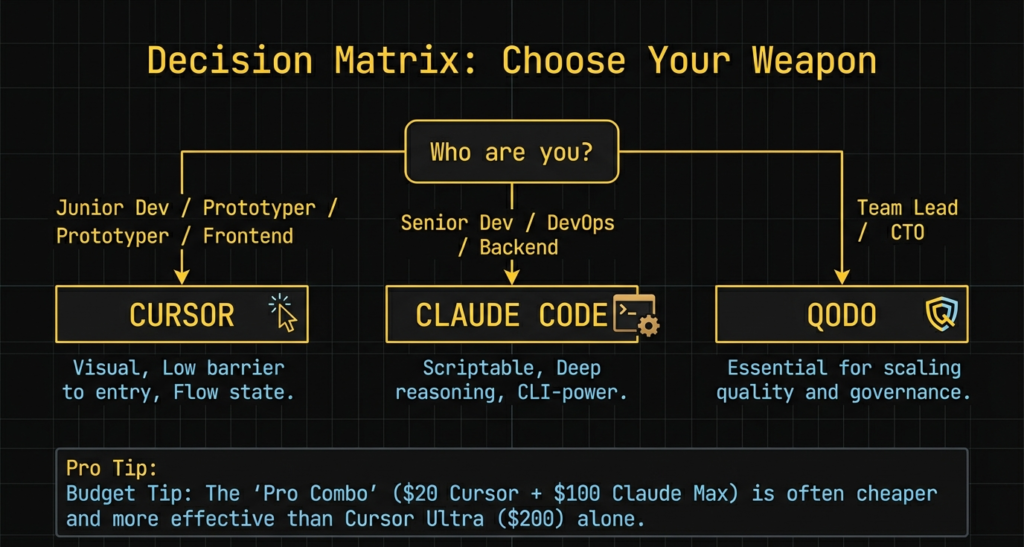
The Smart Way to Use Cursor and Claude Together
Direct answer
Use Claude to think. Use Cursor to execute.
This workflow changed everything for me 🚀
I start in Claude.
I explain the problem.
I ask for structure.
I confirm assumptions.
Then I move to Cursor.
I implement quickly.
I refactor safely.
I ship confidently.
Many experienced devs on Reddit use this loop quietly. They do not argue cursor vs claude code. They combine both.
Claude prevents wrong direction.
Cursor removes friction.
Together, they feel complete.
Final Verdict Cursor vs Claude Code
Direct answer
They solve different layers of work.
Cursor accelerates hands.
Claude sharpens mind.
Asking which one is better misses the point.
The real advantage comes from knowing when to switch.
That skill separates amateurs from professionals.
FAQ Cursor vs Claude Code
Is Cursor better than Claude for coding
Short answer
For speed yes. For correctness no.
Can Claude Code replace Cursor
Short answer
No. Claude does not edit files directly.
Do professional developers use Claude Code
Short answer
Yes. Especially for architecture and debugging.
Is Cursor worth paying for compared to Claude
Short answer
Worth it for execution heavy work.
Which is better for beginners Cursor or Claude Code
Short answer
Claude for learning. Cursor for practice.
If you master both, you stop asking claude vs cursor and start shipping better software faster 😄