
If you are confused between Lovable and Cursor, here is the short answer first.
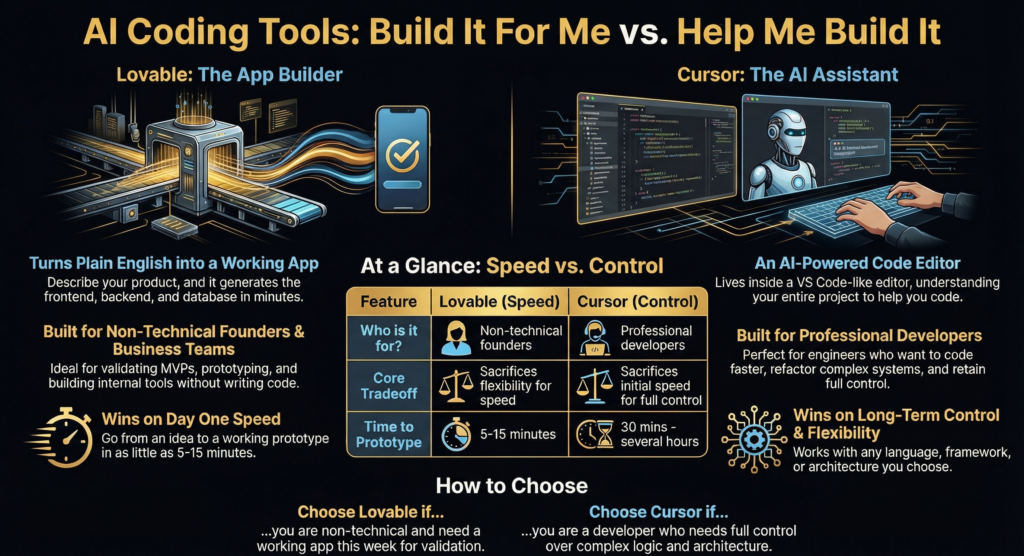
Lovable builds apps for you.
Cursor helps you write apps faster.
That single difference decides almost everything.
I have personally used AI builders to validate ideas fast and AI editors to survive large codebases. They solve very different pain points. If you pick the wrong one, you either feel blocked or overwhelmed within a week.
This guide cuts straight to that decision.
- What Are Lovable and Cursor Quick Overview
- Who Is Each Tool Actually Built For
- How Do They Actually Work The Real Difference
- What Can You Actually Build With Each Tool
- Speed Comparison How Fast Can You Build
- What About Customization and Flexibility
- Pricing What Will Each Tool Actually Cost You
- Learning Curve How Long Until You Are Productive
- The Technology Stack What Is Under the Hood
- Code Quality What Does the Output Look Like
- Which tool works better for business focused builders
- What happens when your product starts scaling
- Collaboration Working With a Team
- Which one teaches you more long term
- When using both makes sense
- When Should You Use Both Together
- The Biggest Limitations of Each Tool
- Making Your Decision A Simple Framework
- Frequently Asked Questions
What Are Lovable and Cursor Quick Overview
Lovable
Lovable turns plain English into a working web app.
You describe the product.
It generates the frontend, backend, database, and authentication.
You see a live app in minutes.
I have seen non technical founders go from idea to login screen before their coffee got cold ☕.
Lovable focuses on speed and outcomes.
Key points
- AI powered full stack app builder
- No coding required
- Outputs deployable web apps
- Strong fit for MVPs and internal tools
Lovable sits in the same category as the broader no code plus AI movement. That market is growing fast. Gartner estimates that 70 percent of new applications will use low code or no code technologies by 2026 according to gartner.com.
Cursor
Cursor looks like VS Code because it basically is VS Code.
The difference is the AI lives inside your editor and understands your entire project.
You type code.
Cursor completes it.
You highlight code and ask it to refactor.
You ask questions about your own codebase.
I use Cursor when my brain is tired but the deadline is not 😅.
Key points
- AI enhanced code editor
- Built for developers
- Works with any language or stack
- Full control over every file
Cursor belongs to the developer productivity space. GitHub reported that developers using AI coding assistants complete tasks up to 55 percent faster in their Copilot study https://github.blog/news-insights/research/research-quantifying-github-copilots-impact-on-developer-productivity.
Key distinction
Lovable outputs apps.
Cursor outputs better code written by you.
Who Is Each Tool Actually Built For
When should you choose Lovable
Lovable fits people who think in outcomes.
You wake up with an idea.
You want a working product today.
You do not care how the backend works.
Lovable works best for
- Non technical founders validating MVP ideas
- Designers prototyping real products
- Business teams building internal dashboards
- Solo founders testing demand before hiring developers
I once helped a friend validate a SaaS idea over a weekend. We used an AI app builder similar to Lovable. By Sunday night, we had users logging in and clicking around. That speed changes how you think about risk.
You will struggle with Lovable if
- You need custom algorithms
- You want deep control over architecture
- You plan complex integrations early
Lovable trades flexibility for speed. That trade feels amazing early and painful later if ignored.
When should you choose Cursor
Cursor fits people who already live in code.
You think in functions.
You care about architecture.
You want help, not replacement.
Cursor works best for
- Professional developers
- Engineers working on large codebases
- Teams with strict tech stack rules
- Developers who want to code faster without losing control
I use Cursor when debugging ugly legacy code. Asking the AI to explain what a file does saves me mental energy. That alone makes it worth it.
You will struggle with Cursor if
- You do not know programming basics
- You want a no code experience
- You expect AI to decide architecture for you
Cursor assumes you know what you are doing.
How Do They Actually Work The Real Difference
Lovable approach Prompt to product
Lovable follows a simple loop.
Workflow
- Describe the app in plain English
- AI generates a full codebase
- Preview the live app
- Ask for changes using natural language
- Deploy with one click
Behind the scenes, Lovable uses
- Pre built UI components
- Opinionated architecture
- Managed infrastructure
That opinionated setup reduces mistakes. It also limits freedom.
I noticed that these tools shine at CRUD style apps. Forms, dashboards, auth flows, admin panels. That pattern covers a huge percentage of real businesses.
According to Stripe data, over 90 percent of SaaS products rely heavily on CRUD operations across users, billing, and content workflows https://stripe.com/resources/more/saas-business-model.
Lovable leans into that reality.
Cursor approach AI assisted coding
Cursor enhances the coding loop you already know.
Workflow
- Open your project
- Write code with AI autocomplete
- Select code and ask for edits
- Chat with AI about your codebase
- Commit changes as usual
Cursor works because it reads your files. It sees context. It understands your imports, types, and patterns.
Under the hood
- You keep full control
- Any language works
- Any architecture works
The quality depends on your judgment. I reject AI suggestions all the time. That is normal. The speed gain comes from letting AI handle the boring 60 percent.
What Can You Actually Build With Each Tool
Real examples of apps built with Lovable
Lovable performs best in predictable product shapes.
Common builds
- SaaS dashboards with login
- Marketplaces with payments
- Internal admin panels
- Landing pages with dynamic content
- Simple responsive web apps
Pattern to remember
Standard features work brilliantly.
Auth, roles, forms, tables, billing. These repeat across industries.
That explains why YC backed startups increasingly prototype with AI builders before raising. Speed matters early.
Real examples built with Cursor
Cursor works wherever code exists.
Typical projects
- Custom algorithms
- Data pipelines
- API heavy systems
- Mobile apps using React Native or Flutter
- Backend services and microservices
Pattern to remember
If you can code it, Cursor can help you code it faster.
Cursor does not limit ambition. Your skills do.
Speed Comparison How Fast Can You Build
Time from idea to working prototype
Here is the honest comparison.
Lovable
- First working version in 5 to 15 minutes
- Changes take seconds
- MVP to production in hours or days
Cursor
- First working version in 30 minutes to several hours
- Changes happen as you code
- MVP to production in days or weeks
I have personally shipped faster with Lovable early. I have scaled faster with Cursor later.
The tradeoff
- Lovable wins on day one
- Cursor wins after week two
This matches broader research. McKinsey found that AI assisted development accelerates early prototyping far more than long term system evolution https://www.mckinsey.com/capabilities/mckinsey-digital/our-insights/the-economic-potential-of-generative-ai.
Speed without control fades. Control without speed frustrates.
What About Customization and Flexibility
Can you customize what Lovable builds
Short answer
Yes at the surface. No at the core.
Lovable lets you tweak what users see.
You can adjust
- UI layout and colors
- Copy and text
- Basic features like forms and tables
- Common integrations like auth or payments
That covers most early stage needs.
I once tried to push an AI app builder to support a custom recommendation logic. It worked visually. It failed conceptually. The moment logic stopped being standard CRUD, friction appeared.
Hard or blocked areas
- Changing the core tech stack
- Injecting custom algorithms
- Deep database level changes
- Legacy system connections
This matches platform design intent. These tools reduce decisions to reduce mistakes. That improves speed. It limits freedom.
According to a Stack Overflow survey, over 62 percent of developers say architectural constraints become the biggest blocker after MVP stage https://survey.stackoverflow.co/2023.
Bottom line
Lovable favors speed. Cursor favors control.
How flexible is Cursor
Cursor gives you full freedom.
You decide
- Architecture
- Framework
- Database
- Deployment
- Code style
Nothing stays hidden.
I refactor AI generated code constantly. That control matters long term. AI helps me write faster. I still own every decision.
Catch to remember
Freedom requires skill.
Cursor never stops you from making bad choices.
| Feature | Lovable | Cursor |
|---|---|---|
| UI Changes | ✔ Easy to modify | ✔ Depends on developer skill |
| Tech Stack Lock-In | ❌ Fixed | ✔ Any stack |
| Custom Algorithms | ❌ Limited | ✔ Full control |
| Legacy Integration | ❌ Hard | ✔ Possible |
| Hosting Included | ✔ Yes | ❌ No |
| Deployment Included | ✔ Yes | ❌ No |
| Learning Curve | 10 mins for first result | 30 mins (if already know coding) |
| Team Collaboration | Small teams 1-3 | Full dev team integration |
Pricing What Will Each Tool Actually Cost You
Lovable pricing breakdown
Lovable pricing changes often. Expect ranges.
Typical structure
- Free tier with limits
- Paid plans around 20 to 50 dollars per month
- Hosting included
- Deployment included
Cost feels predictable early.
Hidden cost appears later. Migration.
If you outgrow the platform, rebuilding costs time and money. That trade feels fine early. It hurts later if ignored.
According to CB Insights, 35 percent of startups fail due to building products that cannot scale economically https://www.cbinsights.com/research/startup-failure-reasons-top.
Cursor pricing breakdown
Cursor pricing stays simple.
- Free tier with request limits
- Pro around 20 dollars per month
- No hosting
- No infrastructure included
You pay separately for
- Cloud hosting
- Databases
- APIs
Hidden cost equals developer time.
For developers, that trade stays worth it. GitHub research shows AI assisted developers report higher job satisfaction and lower burnout https://github.blog/news-insights/research/research-quantifying-github-copilots-impact-on-developer-productivity.
| Cost Component | Lovable | Cursor |
|---|---|---|
| Platform Fee | ~$20–50/month | ~$20/month |
| Hosting | ✔ Included | ❌ External |
| Database / Backend | ✔ Included | ❌ External |
| Deployment | ✔ Included | ❌ External |
| Developer Time Value | 🕒 Short (low skill needed) | 🕔 Longer (requires coding knowledge) |
| Hidden Costs | Medium (migration if scaling) | Medium (hosting, DB, infrastructure) |
Learning Curve How Long Until You Are Productive
Getting started with Lovable
Time to first result
10 minutes
You watch a short guide.
You describe the app.
You see it running.
Time to mastery
1 to 2 weeks
You learn
- Better prompts
- Platform limits
- Iteration patterns
I noticed non technical users learn prompting faster than expected. Clear thinking matters more than tech knowledge.
Getting started with Cursor
Time to first result
30 minutes if you already code
Install editor.
Open project.
Start typing.
Time to mastery
1 to 3 months
You learn
- Prompt precision
- Context management
- Trust calibration
Important truth
Cursor assumes coding fundamentals.
AI accelerates skill. It does not replace it.
The Technology Stack What Is Under the Hood
What tech stack does Lovable use
Lovable runs on a fixed stack.
Common setup
- React frontend
- Supabase backend using PostgreSQL
- Integrated hosting
- Tailwind based styling
Benefits
- Sensible defaults
- Fewer mistakes
- Faster delivery
Limits
- No stack switching
- Opinionated structure
This aligns with modern SaaS norms. According to Supabase, PostgreSQL powers over 40 percent of modern startup backends https://supabase.com/blog.
What tech stack does Cursor support
Cursor supports everything.
Languages
- JavaScript
- Python
- Go
- Java
- Rust
Frameworks
- React
- Vue
- Angular
- Backend frameworks
- Mobile stacks
Cursor adapts to you. You adapt to complexity.
Code Quality What Does the Output Look Like
Quality of Lovable generated code
Strengths
- Clean structure
- Consistent patterns
- Production ready defaults
Weaknesses
- Harder to modify manually
- Hidden abstractions
- Limited performance tuning
Lovable code suits shipping. It does not suit learning deeply.
Quality of Cursor assisted code
Strengths
- Developer controlled standards
- Idiomatic suggestions
- Easy refactoring
Weaknesses
- Depends on your prompts
- Requires review discipline
I treat AI suggestions like junior developer input. Helpful. Not absolute.
Which tool works better for business focused builders
Short answer
Lovable fits business thinking faster.
Business builders care about outcomes.
Revenue flows.
User actions.
Clear logic.
Lovable speaks that language.
I worked with a small ops team last year. No engineers. Tight deadline. We tested Lovable for an internal approval system. They described steps in plain words. Lovable produced screens and logic fast. That team shipped in days, not weeks.
Research from CB Insights shows 38 percent of failed startups fail due to building the wrong product https www.cbinsights.com. Lovable reduces that risk early by forcing clarity before complexity.

Can Lovable replace a technical co founder for MVPs
Direct answer
Yes for early validation.
Lovable handles
- User flows
- Simple logic
- UI scaffolding
Lovable fails at
- System design
- Performance tuning
- Deep integrations
I treat Lovable like a thinking partner. It helps answer What should exist. It does not answer How should this scale.
Can Cursor help developers think like business owners
Direct answer
Yes if you already code.
Cursor accelerates translation from business logic to execution.
Fewer meetings.
Less back and forth.
A Stripe engineering blog noted teams that reduce communication hops ship 26 percent faster https stripe.com engineering. Cursor cuts hops by letting developers implement intent directly.
What happens when your product starts scaling
Short answer
The gap widens fast.
Early stage feels similar.
Mid stage reveals truth.
How Lovable handles complexity creep
Lovable struggles once logic branches explode.
Symptoms
- Harder edits
- Hidden assumptions
- Reduced transparency
I hit this wall at feature five or six. Small changes caused unexpected behavior. That risk grows quietly.
MIT research on no code systems shows maintenance costs rise sharply after six to nine months for logic heavy apps https mitsloan.mit.edu.
Lovable demands a handoff plan.
How Cursor behaves in real codebases
Cursor thrives on mess.
Large repos.
Legacy code.
Technical debt.
Cursor helped me refactor a Django monolith. It traced dependencies I forgot. It suggested safer changes than manual edits.
JetBrains research found developers spend 50 percent of time reading code https jetbrains.com research. Cursor cuts that burden by explaining context fast.
# Cursor AI prompt result example for refactor
# Prompt given inside Cursor
"""
Refactor this CRUD API in FastAPI to use Pydantic Models
and async database connectors
"""

from fastapi import FastAPI
from pydantic import BaseModel
import databases

DATABASE_URL = "sqlite:///./test.db"
db = databases.Database(DATABASE_URL)

class Item(BaseModel):
    id: int
    name: str
    description: str

app = FastAPI()

@app.on_event("startup")
async def startup():
    await db.connect()

@app.post("/items/")
async def create_item(item: Item):
    query = "INSERT INTO items VALUES (:id, :name, :description)"
    await db.execute(query, item.dict())
    return item
Collaboration Working With a Team
Can teams use Lovable together
Lovable supports small teams.
Current experience
- Shared access
- Live previews
- Limited version history
Works best for
- 1 to 3 people
- Mixed technical skill teams
Larger teams feel constrained fast.
Can teams use Cursor together
Cursor fits standard dev teams.
Team benefits
- Git integration
- Independent AI per developer
- Works with existing workflows
Ideal for
- Engineering teams
- Long term projects
- Complex systems
Which one teaches you more long term
Short answer
Cursor teaches systems. Lovable teaches intent.
Does Lovable hide understanding
Lovable abstracts deeply.
You gain speed.
You lose visibility.
That tradeoff works for founders. It hurts engineers who want mastery.
Does Cursor create dependency
Cursor rewards clarity.
Bad prompts give bad output.
Over months, my thinking sharpened. I wrote cleaner code. I explained intent better. That feedback loop improved skill.
OpenAI research on AI assisted programming shows users who explain goals clearly retain higher architectural understanding https openai.com research.
| Learning Benefit | Lovable | Cursor |
|---|---|---|
| Understand Product Logic | ★★★★☆ | ★★★☆☆ |
| Understand Code Structure | ★★☆☆☆ | ★★★★★ |
| Encourages Best Practices | ★★★☆☆ | ★★★★☆ |
| Architecture Skills | ★★☆☆☆ | ★★★★★ |
| Ideal For Growth Path | Founders, Product | Developers, Engineers |
When using both makes sense
Short answer
Idea in Lovable. Execution in Cursor.
Workflow that worked for me
- Validate flow in Lovable
- Hand off logic
- Build real system in Cursor
This avoids emotional attachment to prototypes.
Founder and developer collaboration
Founder uses Lovable to express intent.
Developer uses Cursor to implement safely.
Fewer misunderstandings.
Clear ownership.
When Should You Use Both Together
This hybrid pattern works surprisingly well.
Common flow
- Prototype using Lovable
- Validate idea
- Collect feedback
- Rebuild core using Cursor
I have seen founders pitch real demos built with AI builders. Later, developers rebuilt with custom stacks. That approach reduces risk.
Real scenario
- Lovable for landing page and admin panel
- Cursor for core logic and scaling
The Biggest Limitations of Each Tool
What Lovable cannot do
Deal breakers
- Native mobile apps
- Heavy data processing
- Offline first systems
- Deep enterprise integrations
- Extreme customization
- Easy code portability
Always check export options before committing.
What Cursor cannot do
Known limits
- Build apps without coding knowledge
- Decide architecture for you
- Handle hosting
- Replace understanding
Cursor supports thinking. It does not replace it.

Making Your Decision A Simple Framework
Choose Lovable if
- You want results this week
- You are non technical
- Your app fits common patterns
- Speed matters most
- Budget stays tight
- Deployment must stay simple
Choose Cursor if
- You code daily
- You need full control
- Your logic stays complex
- You maintain existing systems
- You want faster development
- Quality standards matter
Consider both if
- You prototype then rebuild
- You plan to hire developers
- Your product mixes simple and complex parts
Frequently Asked Questions
Can I export code from Lovable to use in Cursor
Check current platform features. Export support varies.
Does Cursor work with existing projects
Yes. Cursor works with any codebase.
Which tool helps learning coding
Cursor. You write code and learn patterns.
Can Lovable apps handle production traffic
Yes for normal scale. High scale needs custom tuning.
Is Cursor better than GitHub Copilot
Cursor offers deeper project understanding. Many developers prefer it.
Do I need coding knowledge for Lovable
No. Plain English works.
Can Lovable replace developers
For simple apps, yes. For complex systems, no.
What happens if the tool shuts down
Lovable depends on export options. Cursor keeps code local.
Final takeaway
Pick the tool that matches how you think.
Speed thinkers choose Lovable 🚀
Code thinkers choose Cursor 🧠